What to include on a remodeling invoice
A homeowner should be able to tell which stage an invoice covers and why the amount is what it is. List:
- Your business name, contact details and license number where your state requires it.
- The client's name and the project address.
- Invoice number, date, due date and the contract total.
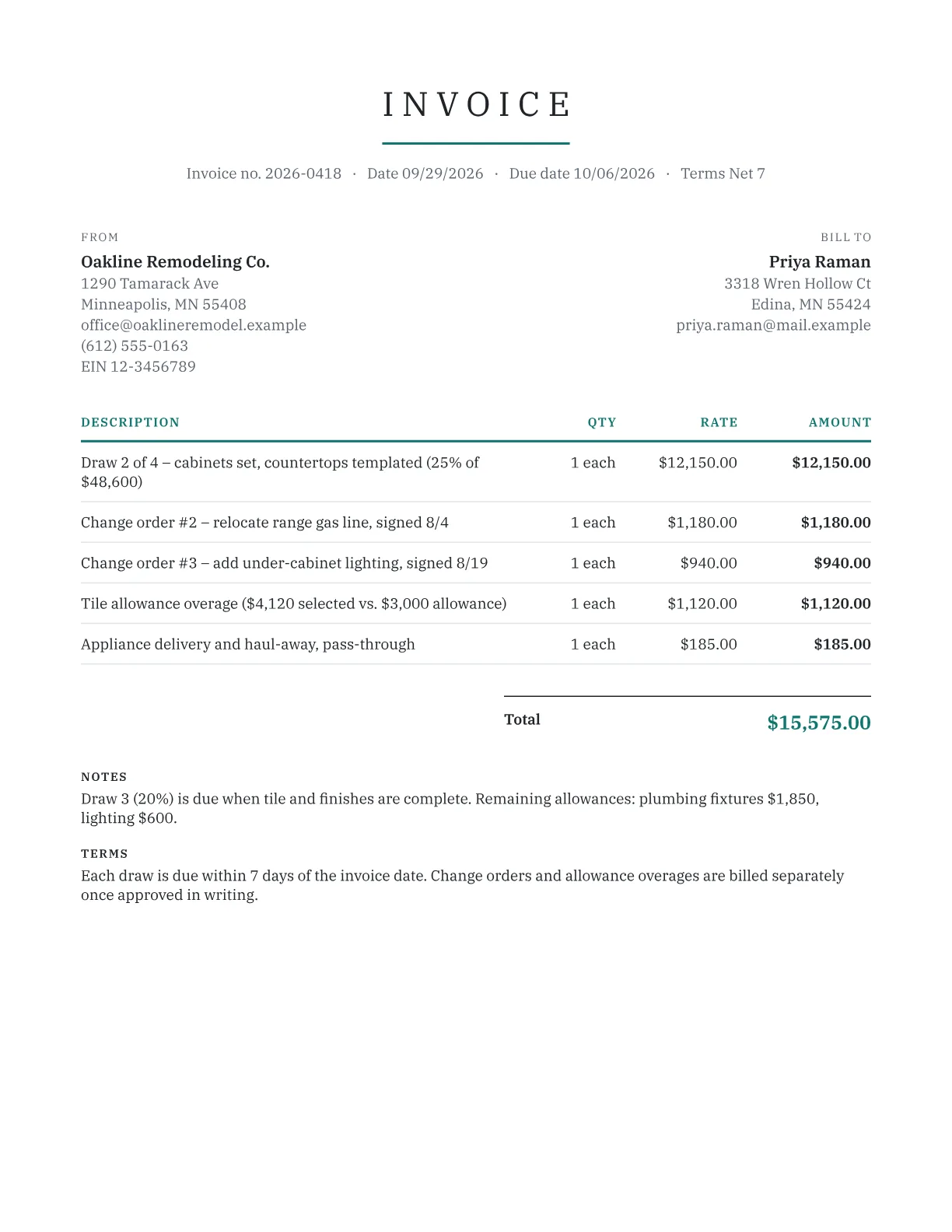
- The milestone reached and the share of the contract it represents.
- Change orders and allowance overages, each on its own line.
- Pass-through costs such as permits and dumpster swaps.
- Payments received to date and the balance due.
A draw schedule homeowners can follow
Tie each draw to something the homeowner can see, not a calendar date. For a $48,600 kitchen:
| Stage | Share | Amount |
|---|---|---|
| Deposit at signing | 10% | $4,860 |
| Demolition and rough-in passed | 25% | $12,150 |
| Cabinets set, counters templated | 25% | $12,150 |
| Tile and finishes complete | 20% | $9,720 |
| Final walkthrough and punch list | 20% | $9,720 |
Keep the last draw large enough to matter until the punch list is done. Check deposit limits before you copy this schedule. Under California law, enforced by the Contractors State License Board, most home improvement down payments are capped at $1,000 or 10% of the contract price, whichever is less, and other states set their own rules.
Allowances and change orders
Allowances cover items the client hasn't chosen yet, like tile or light fixtures. When a selection comes in over budget, bill the difference on its own line and show both numbers: 'Tile: $4,120 selected vs. $3,000 allowance: $1,120.' Credit underruns on the final invoice with a flat discount or a credit note.
Change orders follow the same rule: signed before the work, numbered, dated and billed separately, so the contract total stays traceable. If your state taxes materials but not labor, split each one into materials and labor lines and use the taxable toggle.
Estimates, history and downloads
Send the price first with the estimate generator, then invoice each draw here. Your last 50 invoices stay in local history, so you can duplicate the previous draw and change the stage. The free remodeling invoice also comes as a Word, Excel or PDF download.
Prefer a file?
Download this template, prefilled with typical line items. No email needed.
Frequently asked questions
How should a remodeling project be billed?
Many remodelers take a deposit at signing, then bill draws at milestones the homeowner can verify, such as rough-in inspection, cabinet installation and final walkthrough. Holding 10% to 20% for the final draw gives both sides a reason to finish the punch list. Check your state's deposit limits before signing.
What is an allowance on a remodeling invoice?
An allowance is a budget set in the contract for items the client picks later, such as tile, faucets or lighting. If the final choice costs more, you bill the overage as a separate line; if it costs less, you credit the difference. Showing the selection price next to the allowance prevents most disputes.
Can I bill a change order the client approved verbally?
You can, but a verbal approval is hard to prove if the homeowner later disputes it, and some states require change orders on home improvement jobs to be in writing. Get a signature or a written email approval before starting, then bill the change on its own line with the date it was approved.
Is the final payment due before the punch list is finished?
That depends on your contract. Many remodelers tie the final draw to substantial completion and hold back a small amount until punch list items are done. Spell out the trigger in the contract and repeat it in the invoice notes, so the homeowner knows exactly what releases the last payment.
Do I charge sales tax on a kitchen remodel?
It varies by state. Some states tax the materials you install, some tax the full contract price, and others treat you as the consumer who pays tax when buying materials. Use the per-line taxable toggle to match your state's rule, and confirm it with your state revenue department or an accountant.