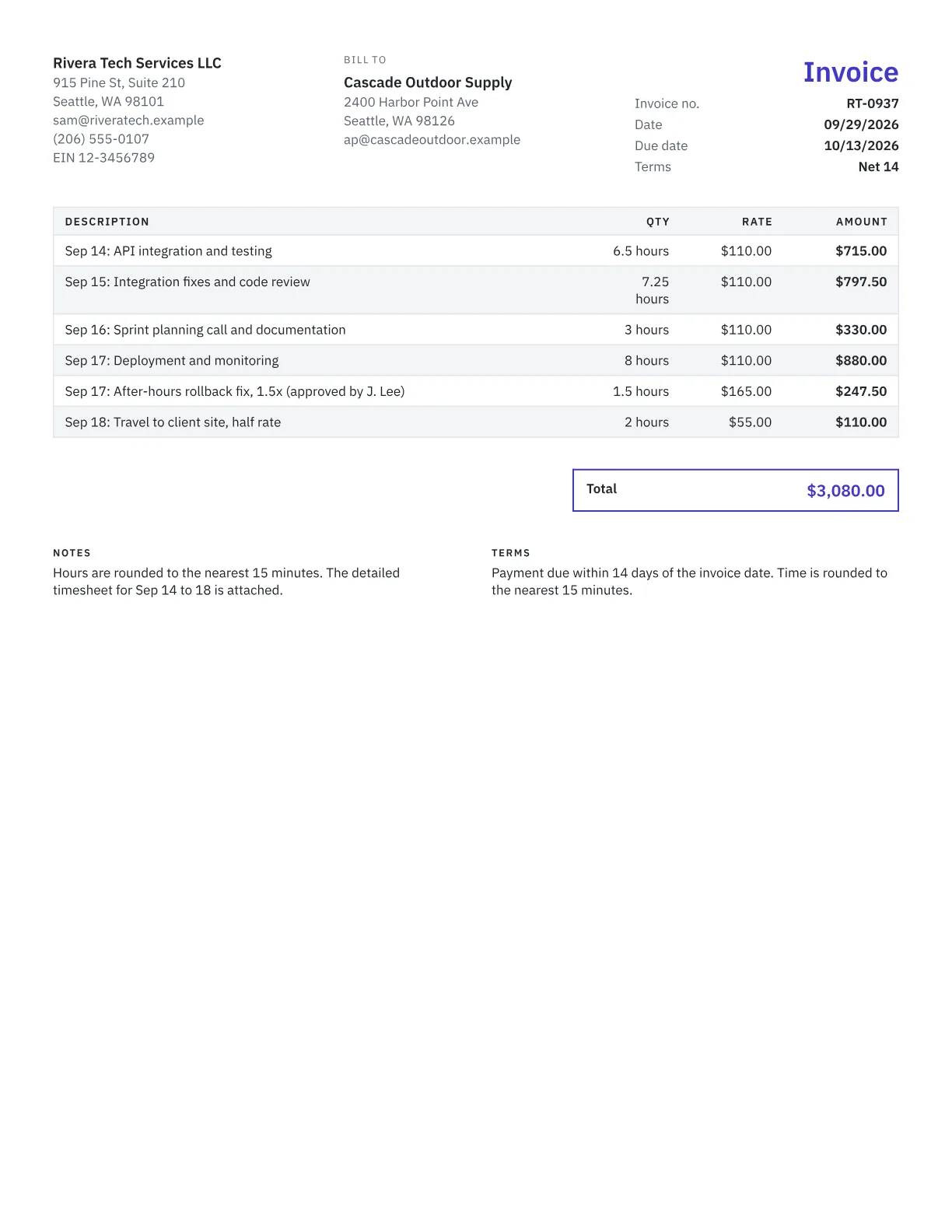
What to include on an hourly invoice
- Your name or business name and contact details.
- The client's name and billing contact.
- Invoice number, date, due date and the period covered.
- Hours by date or by task, with a short description of the work.
- The rate for each kind of time, such as standard, overtime or travel.
- Your rounding rule, for example to the nearest 15 minutes.
- The total, payment terms and how to pay.
Rounding and rate tables
Pick one rounding increment, state it, and apply it the same way every time. Six-minute (0.1 hour) increments are common in legal and accounting work; 15-minute (0.25 hour) increments suit most other work. Rounding to the nearest increment:
| Time worked | Nearest 6 minutes | Nearest 15 minutes |
|---|---|---|
| 40 minutes | 0.7 hour | 0.75 hour |
| 1 hour 50 minutes | 1.8 hours | 1.75 hours |
If you charge different rates for different work, such as senior and junior staff, on-site and remote, or travel at half rate, put each on its own line instead of blending them into one average.
Overtime and timesheets
Overtime rules under the federal Fair Labor Standards Act cover employees, not independent contractors, so an overtime premium on an invoice exists only if your contract sets one. If it does, bill premium hours on a separate line at the agreed rate, often 1.5 times standard, and note who approved them.
For anything longer than a few lines, attach a timesheet with dates, start and end times, and tasks, or bill day by day with the timesheet invoice generator. The hourly rate calculator helps you set the rate itself. The free hourly invoice is also available as a Word, Excel or PDF download.
Prefer a file?
Download this template, prefilled with typical line items. No email needed.
Frequently asked questions
How should I round billable time?
Choose one increment, state it in your contract or invoice terms, and use it every time. Six-minute increments, a tenth of an hour, are common for lawyers and accountants, while 15-minute increments are typical elsewhere. Rounding to the nearest increment is easier to defend than always rounding up.
Should I attach a timesheet to an hourly invoice?
For anything more than a few hours, yes. A timesheet with dates, start and end times and task descriptions answers most questions before the client asks them, and many accounts payable teams require one for hourly work. Summarize the hours on the invoice and attach the detail.
Can independent contractors charge overtime?
Only if the contract says so. Federal overtime rules cover employees, not independent contractors, so there is no automatic time-and-a-half. Many contracts set a premium, often 1.5 times the standard rate, for pre-approved hours beyond 40 a week or outside business hours. Bill those hours on a separate line.
How do I bill travel time?
Agree on it in advance. Common approaches are full rate, half rate, or no charge for local travel with a flat fee for longer trips. Bill travel time on its own line with the hours and rate, and list mileage, fares or parking as separate expenses.
Can I paste hours from a spreadsheet?
Yes. Copy rows from Excel or Google Sheets and paste them into the line items, and each row becomes an invoice line. It's the quickest way to turn a week of tracked time into an invoice without retyping every entry.