

Why Invoice Generators
- Saves Time on Manual Billing
- Reduces Human Errors
- Improves Cash Flow
- Keeps Records Organized
- Enhances Professional Image
- Enables Faster Payment Collection
- Accessible Anywhere
- 15+ Invoice Templates
Invoice
From
Company Name
To
Client name
| Description | Rate | Qty | Item Tax | Amount |
|---|---|---|---|---|
| 1 | 2 | 4 | 5 | 6 |
Notes -
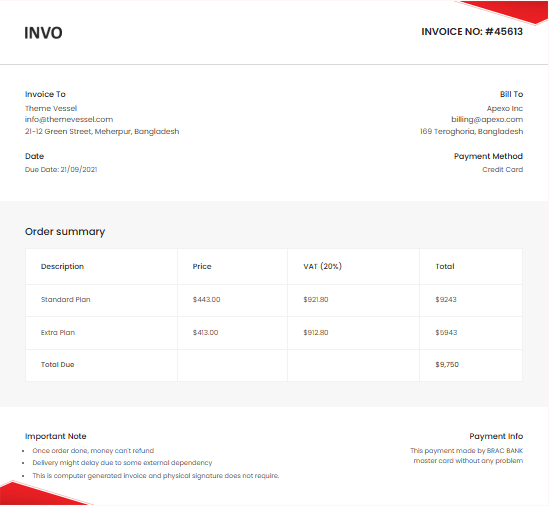
Invoice No: #45613
From
Company Name
To
Client name
Order summary
| Description | Price | Qty | Item Tax | Total |
|---|---|---|---|---|
| 1 | 2 | 4 | 5 | 6 |
| Subtotal | $9,750 | |||
| Discount (0%) | - $0.00 | |||
| (0%) | + $0.00 | |||
| Total Due | $0.00 |
Important Note
Payment Info
This payment made by BRAC BANK master card without any problem
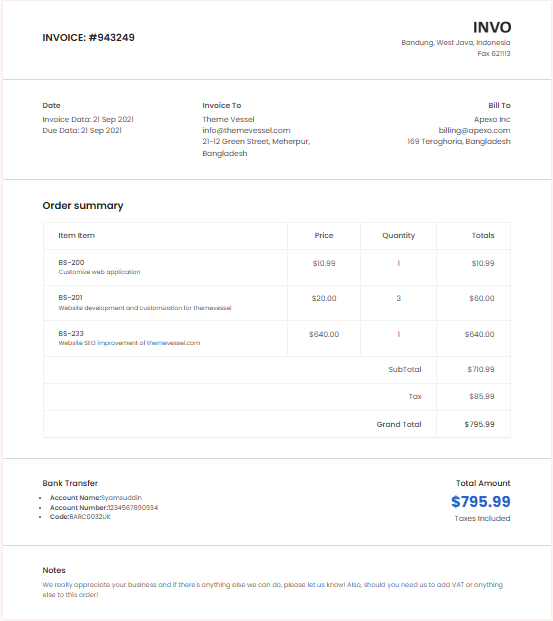
Invoice: #943249
21-12 Green Street,
Meherpur,
Bangladesh,
Date
Invoice Data: 21 Sep 2021
Invoice To
Theme Vessel
21-12 Green Street,
Meherpur,
Bangladesh,
12345
Bill To
Theme Vessel
billing@apexo.com
169 Teroghoria,
Vaisali Nagar,
Bangladesh,
12345,
Order summary
| Item Item | Price | Quantity | Item Tax | Totals |
|---|---|---|---|---|
| 1 | 2 | 4 | 5 | 6 |
| SubTotal | $710.99 | |||
| Discount (0%) | - $0.00 | |||
| (0%) | + $0.00 | |||
| Grand Total | $0.00 | |||
Bank Transfer
- Account Name:Syamsuddin
- Account Number:1234567890934
- Code:BARC0032UK
Total Amount
$795.99
Taxes Included
Notes
We really appreciate your business and if there's anything else we can do, please let us know! Also, should you need us to add VAT or anything else to this order!
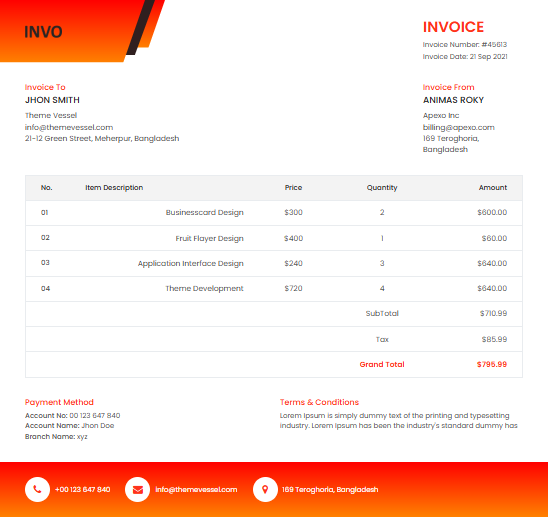
Invoice
Invoice Number: #45613
Invoice Date: 21 Sep 2021
Invoice To
Jhon Smith
21-12 Green Street,
Meherpur,
Bangladesh,
12345
Invoice From
Animas Roky
billing@apexo.com
169 Teroghoria,
Vaisali Nagar,
Bangladesh,
12345
| Item Description | Price | Quantity | Item Tax | Amount |
|---|---|---|---|---|
| 1 | 2 | 4 | 5 | 6 |
| SubTotal | $710.99 | |||
| Discount (0%) | - $0.00 | |||
| (0%) | + $0.00 | |||
| Grand Total | $0.00 |
Payment Method
- Account No: 00 123 647 840
- Account Name: Jhon Doe
- Branch Name: xyz
Terms & Conditions
Lorem Ipsum is simply dummy text of the printing and typesetting industry. Lorem Ipsum has been the industry's standard dummy has
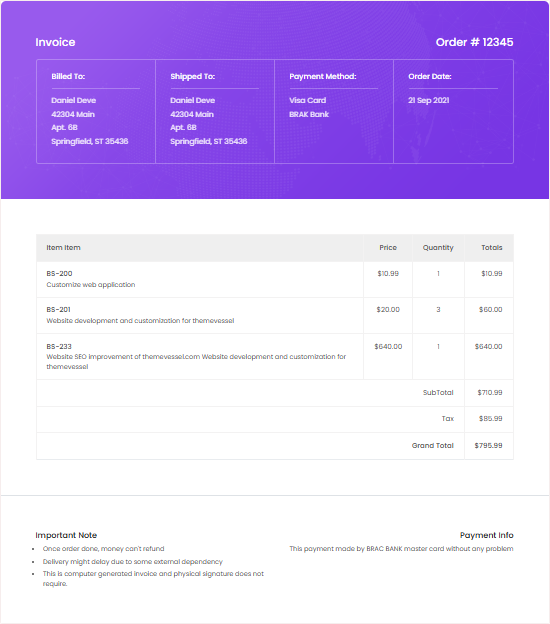
Order #12345
Billed To:
Daniel Deve
42304 Main
Springfield, ST 35436
Shipped To:
Daniel Deve
42304 Main
Springfield, ST 35436
Payment Method:
Visa Card
BRAK Bank
Order Date:
21 Sep 2021
| Item Item | Price | Quantity | Item Tax | Totals |
|---|---|---|---|---|
| 1 | 2 | 4 | 5 | 6 |
| SubTotal | $710.99 | |||
| Discount (0%) | - $0.00 | |||
| (0%) | + $0.00 | |||
| Grand Total | $0.00 | |||
Important Note
We really appreciate your business and if there's anything else we can do, please let us know! Also, should you need us to add VAT or anything else to this order!
Payment Info
This payment made by BRAC BANK master card without any problem
Invoice
Invoice Number #45613
Invoice Date 21 Sep 2021
Invoice To
Theme Vessel
21-12 Green Street,
Meherpur,
Bangladesh,
12345
Bill To
Theme Vessel
billing@apexo.com
169 Teroghoria,
Vaisali Nagar,
Bangladesh,
12345
Date
Payment Method
Credit Card
| Item Item | Price | Quantity | Item Tax | Totals |
|---|---|---|---|---|
| 1 | 2 | 4 | 5 | 6 |
| SubTotal | $710.99 | |||
| Discount (0%) | - $0.00 | |||
| (0%) | + $0.00 | |||
| Grand Total | $0.00 | |||
Payment Info
- Account Name: 647 840
- Account Number: Jhon Doe
- Branch Name: xyz
Terms and Condistions
Once order done, money can't refund. Delivery might delay due to some external
Contact Us
- 169 Teroghoria, Bangladesh
- info@themevessel.com
- +00 123 647 840
Invoice
Invoice No: #45613
Invoice Date: 21 Sep 2021
Invoice To
Jhon Smith
Theme Vessel
billing@apexo.com
169 Teroghoria,
Vaisali Nagar,
Bangladesh,
12345
Invoice From
Animas Roky
Theme Vessel
21-12 Green Street,
Meherpur,
Bangladesh,
12345
| Description | Price | Qty | Item Tax | Total |
|---|---|---|---|---|
| 1 | 2 | 4 | 5 | 6 |
| SubTotal | $710.99 | |||
| Discount (0%) | - $0.00 | |||
| (0%) | + $0.00 | |||
| Grand Total | $0.00 |
Terms & Conditions
Lorem Ipsum is simply dummy text of the printing and typesetting industry. Lorem Ipsum has been the industry's standard dummy.
Payment Method
- Account No: 00 123 647 840
- Account Name: Jhon Doe
- Branch Name: xyz
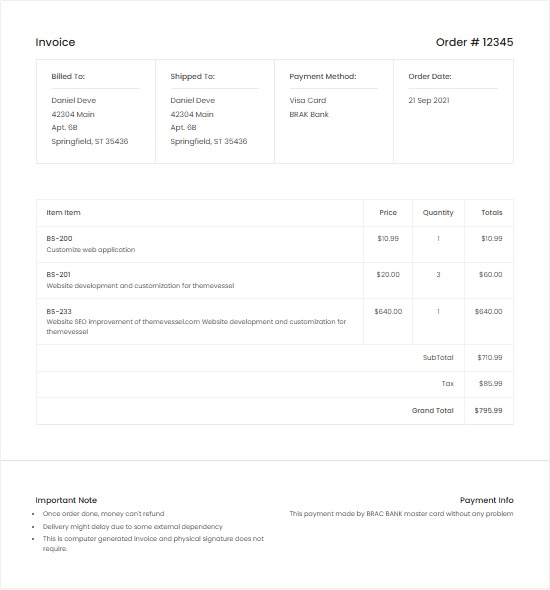
Order #12345
Billed To:
Daniel Deve
42304 Main
Springfield, ST 35436
Shipped To:
Daniel Deve
42304 Main
Springfield, ST 35436
Payment Method:
Visa Card
BRAK Bank
Order Date:
21 Sep 2021
| Item Item | Price | Quantity | Item Tax | Totals |
|---|---|---|---|---|
| 1 | 2 | 4 | 5 | 6 |
| SubTotal | $710.99 | |||
| Discount (0%) | - $0.00 | |||
| (0%) | + $0.00 | |||
| Grand Total | $0.00 | |||
Important Note
This is computer generated invoice and physical signature does not require.
Payment Info
This payment made by BRAC BANK master card without any problem
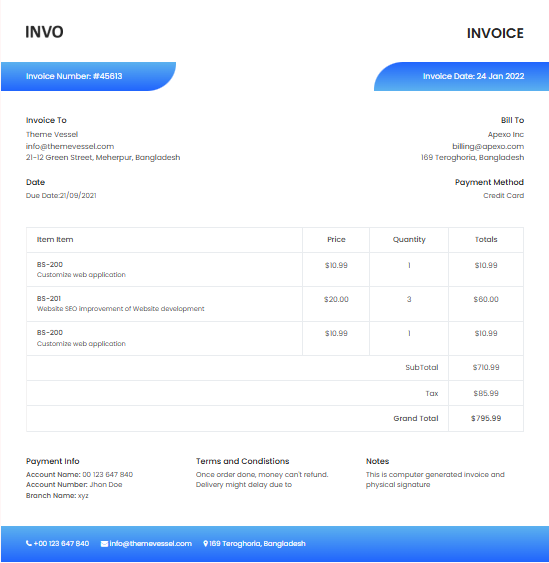
Invoice
Invoice Number: #45613
Invoice Date: 24 Jan 2022
Invoice To
Theme Vessel
21-12 Green Street,
Meherpur,
Bangladesh,
12345
Bill To
Theme Vessel
billing@apexo.com
169 Teroghoria,
Vaisali Nagar,
Bangladesh,
12345,
Date
Due Date: 21/09/2021
Payment Method
Credit Card
| Item Item | Price | Quantity | Item Tax | Totals |
|---|---|---|---|---|
| 1 | 2 | 4 | 5 | 6 |
| SubTotal | $710.99 | |||
| Discount (0%) | - $0.00 | |||
| (0%) | + $0.00 | |||
| Grand Total | $0.00 | |||
Payment Info
- Account Name: 00 123 647 840
- Account Number: Jhon Doe
- Branch Name: xyz
Terms and Condistions
Once order done, money can't refund. Delivery might delay due to
Notes
This is computer generated invoice and physical signature
Invoice: #943249
Invoice To
Theme Vessel
info@themevessel.com
21-12 Green Street,
Meherpur,
Bangladesh,
12345
Bill To
Theme Vessel
billing@apexo.com
169 Teroghoria,
Vaisali Nagar,
Bangladesh,
12345,
Date
Due Date: 21/09/2021
Payment Method
Credit Card
| Item Item | Price | Quantity | Item Tax | Amount |
|---|---|---|---|---|
| 1 | 2 | 4 | 5 | 6 |
| SubTotal | $710.99 | |||
| Discount (0%) | - $0.00 | |||
| (0%) | + $0.00 | |||
| Grand Total | $0.00 | |||
Important Note
This is computer generated invoice and physical signature does not require.
Payment Info
This payment made by BRAC BANK master card without any problem
Invoice #1337
Invoice Date: Sep 14, 2021
Payment Due: Oct 27, 2021
Client Information
Theme Vessel
info@themevessel.com
21-12 Green Street, Meherpur, Bangladesh
Project Description
Build a web application for real estate, agency, agent, house owner company for managing their properties
| Item Item | Price | Quantity | Totals |
|---|---|---|---|
|
BS-200
Customize web application
|
$10.99 | 1 | $10.99 |
|
BS-201
Website development and customization for themevessel
|
$20.00 | 3 | $60.00 |
|
BS-233
Website SEO improvement of themevessel.com Website development and customization for themevessel
|
$640.00 | 1 | $640.00 |
| SubTotal | $710.99 | ||
| Tax | $85.99 | ||
| Grand Total | $795.99 | ||
Important Note
- Once order done, money can't refund
- Delivery might delay due to some external dependency
- This is computer generated invoice and physical signature does not require.
Payment Info
This payment made by BRAC BANK master card without any problem

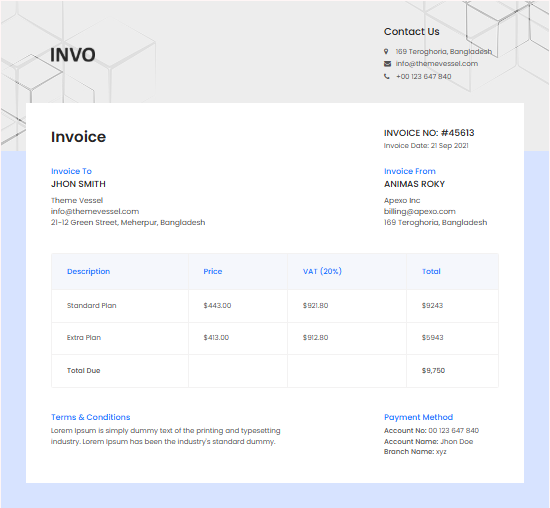
Invoice No: #45613
Invoice Date: 21 Sep 2021
Invoice To
Jhon Smith
Theme Vessel
info@themevessel.com
21-12 Green Street, Meherpur
Invoice From
Animas Roky
Apexo Inc
billing@apexo.com
169 Teroghoria, Bangladesh
| Description | Price | VAT (20%) | Total |
|---|---|---|---|
| Standard Plan | $443.00 | $921.80 | $9243 |
| Extra Plan | $413.00 | $912.80 | $5943 |
| Standard Plan Now | $443.00 | $921.80 | $9243 |
| Extra Plan Now | $413.00 | $912.80 | $5943 |
| 2020 Extra Plan Now | $413.00 | $912.80 | $5943 |
| Standard Plan Bangladesh | $443.00 | $921.80 | $9243 |
| Total Due | $9,750 |
Terms & Conditions
Lorem Ipsum is simply dummy text of the printing and typesetting industry. Lorem Ipsum has been the industry's standard dummy.Payment Method
- Account No: 00 123 647 840
- Account Name: Jhon Doe
- Branch Name: xyz

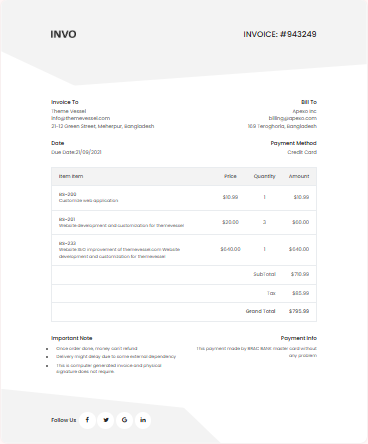
Invoice: #943249
Invoice To
Theme Vessel
info@themevessel.com
21-12 Green Street, Meherpur, Bangladesh
Bill To
Apexo Inc
billing@apexo.com
169 Teroghoria, Bangladesh
Date
Due Date: 24/09/2021
Payment Method
Credit Card
| Item Item | Price | Quantity | Amount |
|---|---|---|---|
|
BS-200
Customize web application
|
$10.99 | 1 | $10.99 |
|
BS-201
Website development and customization for themevessel
|
$20.00 | 3 | $60.00 |
|
BS-233
Website SEO improvement of themevessel.com Website development and customization for themevessel
|
$640.00 | 1 | $640.00 |
| SubTotal | $710.99 | ||
| Tax | $85.99 | ||
| Grand Total | $795.99 | ||
Important Note
- Once order done, money can't refund
- Delivery might delay due to some external dependency
- This is computer generated invoice and physical signature does not require.
Payment Info
This payment made by BRAC BANK master card without any problem
Select Template
.png)
Progress Number
All About Invoice Generator
What an Invoice Really Does?
An invoice is basically a record of what was sold or what kind of service was provided. It tells you how much is owed and when the payment is expected. It keeps things clear between the person who did the work and the person paying for it. Most businesses use invoices to stay organized and have something solid to refer back to when checking payments or tracking deals.
What You Usually See on an Invoice
- Invoice Number : Each invoice comes with its own number so you can tell it apart from others.
- Date : This is when the invoice was created.
- Billing and Shipping Details : Here you will see names, addresses, and other contact info for both the sender and the person getting the invoice.
- Details of Items or Services : This is the list of what was sold or done. It usually shows how many, how much each one costs, and any extra charges added on.
- Discounts and Taxes : You can add any tax amounts or discounts. The tool does the math so you do not have to.
- Total Due : This is the total amount that needs to be paid.
- Payment Terms : This section says when the payment should be made. It might say something like 30 days from the date of the invoice.
- Extra Notes or Policies : You can add return rules, late fees, or anything else the customer should know.
Why You Might Want to Use an Online Invoice Generator?
- Saves Time : It takes way less time than writing an invoice by hand. You fill in the info and the tool lines everything up for you.
- Looks Neat : The finished invoice looks clean and put together, which makes you look more organized.
- Fewer Mistakes : Since it does the adding and subtracting for you, you are less likely to mess something up.
- Quicker Payments : People tend to pay faster when they can understand the bill at a glance.
- Helpful for Taxes : If you need to show tax info later, some tools keep track of that for you.
- Use It Anywhere : As long as you have internet, you can make an invoice on your phone, laptop, or wherever you are.
- Low Cost : Most tools like this are free or cheaper than buying software.
- Data Safety : The info you type in stays private if the tool is set up right.
- Less Paper Waste : No need to print anything if you do not want to.
- Better for Clients : It makes life easier for them too. They get a clear, simple bill that makes sense.
Can I Add My Logo to the Invoice?
Yes, you can. Upload your logo so the invoice has your branding. It makes the bill feel more personal and official.
How to Add Taxes with the Invoice Generator?
You just pick the tax setup you want to use, like adding tax on each item or just once at the end. Then type in the rate and the tool handles the rest.
Will Clients See a Watermark on the Invoice
No. When the invoice is finished, there is no watermark showing. What your customer gets is clean and ready to send.
How a Freelancer Can Make a Time-Based Invoice?
Start with your name and the client’s info. Then give it a number and date. Set when the payment should be made. List the work you did, how many hours it took, and your rate per hour. The tool totals it up. You can add tax too if needed. Once everything looks good, save or send it.
Can You Use the Invoice Generator on a Phone?
Yes, you can. If the site works well on phones, it will look fine and work just like on a computer.
Can Invoices Be Saved in the Online Generator?
Yes. They are saved in your account so you can go back and get them whenever you want.
How to Share an Invoice?
After making the invoice, you can download it as a PDF and send it by email. Or copy a link and send that to your customer.
Why People Like Using the Online Bill Generator?
- Easy to Use : You do not need special skills. Just fill in the blanks.
- Make It Your Own : Add your colors, your logo, whatever fits your style.
- Different Payment Methods : Let your client know how they can pay, like with a card or online transfer.
- Calculates for You : No need to pull out a calculator. The tool adds everything up.
- Easy to Keep and Share : You can save the invoice or send it out as soon as you are finished.
- Safe to Use : Good tools are built to protect the info you enter.
- Works on Any Device : Phone, tablet, desktop—it works everywhere.
- No Surprise Charges : There are no extra fees to worry about. What you see is what you get.
If you are a solo worker, running a small shop, or just need to make a quick bill, this kind of tool can really help. It keeps things simple and helps you get paid without all the stress.

invoicegenerators.net helps you build sample bills for Mobile, WI-Fi and Electricity, with simple edits and fast downloads for Mockups, testing, or practice.